
Datasaur's 2025 Feature Releases: Powering Smarter, Faster Data Labeling
Datasaur's 2025 Feature Releases: Powering Smarter, Faster Data Labeling
Introducing: Labeling Agent
Perhaps the most exciting addition this year is the labeling agent, an AI-powered assistant that helps accelerate your annotation workflow.
Labeling agent can be seamlessly assigned to apply labels directly to documents, acting as a highly efficient labeler. It’s built to complement human reviewers, either by assisting existing teams or by replacing portions of manual labeling altogether. By leveraging multiple large language models (LLMs) in parallel, you can resolve conflicts through review, ensuring a more reliable and robust process.
This approach not only reduces costs and resource demands but also enables teams to scale annotation efforts with ease. Whether you’re working with custom models, a dedicated labeling workforce, or data programming pipelines, the labeling agent integrates smoothly into your workflow, helping you label faster without compromising quality.
Real-time Assisted Labeling: Effortless, Instant Predictions
Manually annotating spans is often the biggest bottleneck in NLP. Real-Time Assisted Labeling bridges the gap between manual effort and full automation by acting like a grammar checker for your annotations by learning from your data to suggest spans as you work.
- Boosts labeling speed by up to 60%: Real-Time Assisted Labeling removes repetitive manual by receiving labeling suggestions on-the-fly, work by pre-highlighting likely spans and labels. Labelers simply verify and move on.
- Zero-Friction Workflow: By removing the need for pre-configuration, we’ve turned assisted labeling into a seamless, "always-on" experience.
- Improves consistency and domain accuracy: Because it learns from your team’s own data and taxonomy, it mirrors your internal standards and reduces label drift across annotators.

Span Labeling Gets a Major Upgrade, a Better Performance Overall
Span labeling has always been central to NLP annotation, and this year we've significantly improved the experience. We've increased the number of tokens you can handle per line, making it easier to work with longer, more complex text without performance hiccups.
But it's not just about capacity, the labeling experience itself is smoother. Whether you're highlighting entities, applying multiple labels, or navigating dense documents, the interface now responds faster and feels more intuitive with a better loading time. If you've ever felt slowed down by clunky token selection, you'll notice the difference immediately.

Search, Filter, and Sort: Find What You Need, Fast
We know that as projects scale, finding specific documents, labels, or labeler activity can become a challenge. That's why we've rolled out substantial improvements to search, filter, and sort capabilities across the platform.
Now you can quickly locate documents based on metadata, labeling status, assigned team members, or custom tags. Filters are more granular, and sorting options give you better control over how you view your project data. These might sound like small tweaks, but when you're managing thousands of documents, they're gamechangers for productivity.

Mixed Labeling: Span+Line+Document & Row+Document
One of the most requested features? The ability to combine different labeling types within a single project. We've delivered.
You can now mix span + row + document labeling in one workflow. This means you can annotate entities within text (span), answer multiple questions for each line and for each document, all without switching between projects.

Similarly, row + document labeling combinations are now supported, giving you the flexibility to answer questions for each row while also handling questions for each document in a unified interface. This is especially useful for projects that require multi-level analysis.
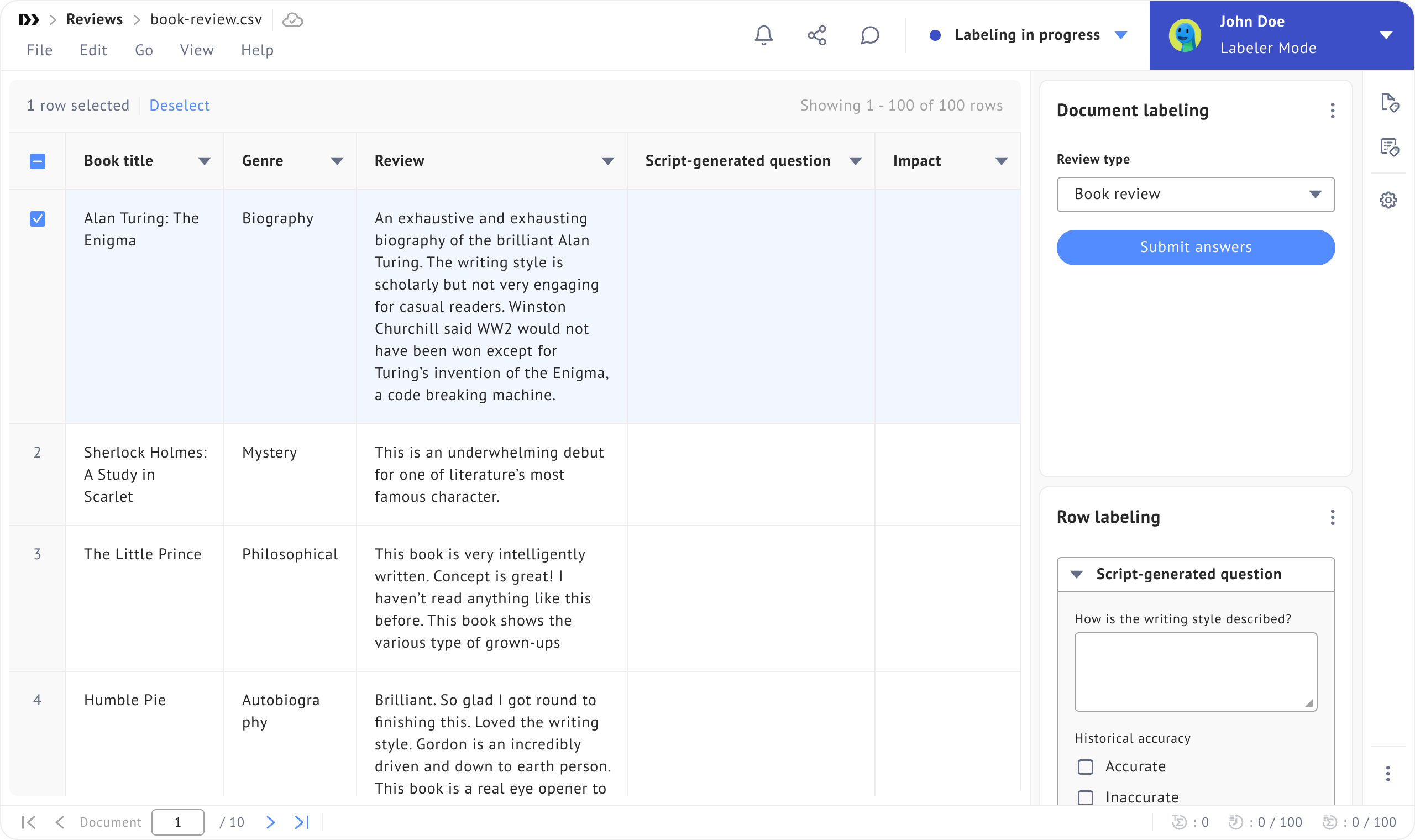
Row Labeling Just Got More Powerful
For teams working with tabular or row-based data, we've introduced the ability to insert and delete rows directly during the labeling process.
This gives labelers more control to structure data on the fly, whether you're cleaning up inconsistencies, adding missing entries, or reorganizing information. It's a simple feature that removes friction and keeps your workflow moving forward.

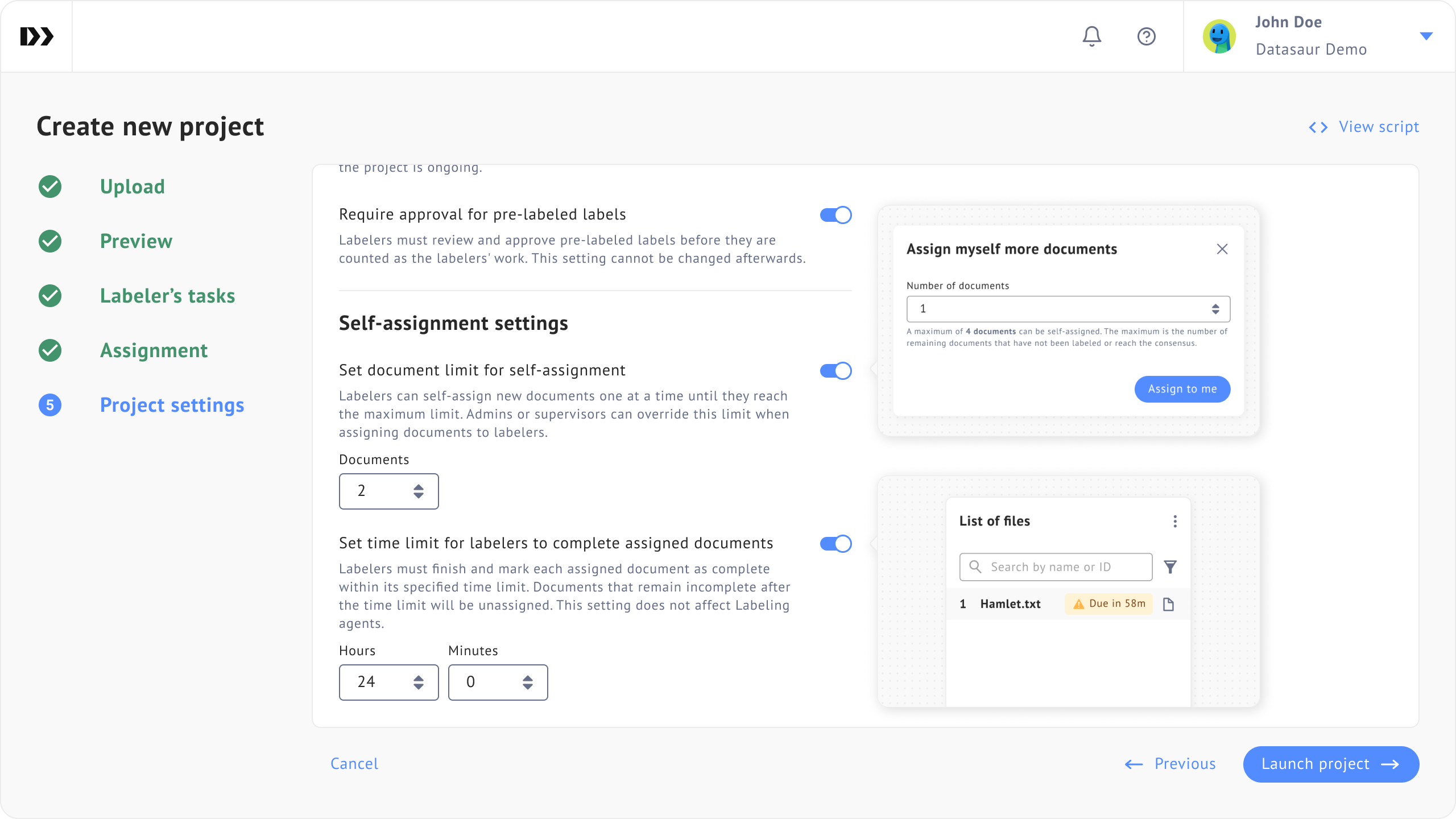
Self-Assignment with Time and Document Limits
Managing labeler workload can be tricky, especially in larger teams or crowdsourced environments. Our improved self-assignment feature now supports time-based and document-based limits.
Labelers can pick up tasks on their own, but you can set boundaries like a maximum number of documents per labeler or a time window for completing assignments. This helps distribute work more evenly, prevents bottlenecks, and gives project managers better oversight without micromanaging.
New Question Types for Smarter Labeling
We've expanded the types of questions you can ask during labeling with two powerful additions:
- Script-generated questions: Dynamically generate questions based on your data or project logic. This is incredibly useful for conditional workflows or when question content needs to adapt based on previous answers or document attributes.
- Multiple choice questions: Sometimes you just need labelers to pick from a set of options. The new multiple-choice format makes this straightforward and speeds up decision-making for classification tasks.
These question types integrate seamlessly with our existing question sets, giving you even more flexibility in designing your annotation workflows.

What's Next?
These updates reflect our commitment to listening to our users and continuously improving the platform. From handling more complex labeling scenarios to giving teams better tools for collaboration and productivity, every feature is built with real-world workflows in mind.
We’re excited to see how you’ll put these new capabilities to work. Stay tuned for more updates as we continue to roll out enhancements throughout 2026. For real-time updates and detailed information on the latest changes, be sure to check our release notes documentation.
Have feedback or questions about any of these features? Reach out to our team or explore the full documentation at docs.datasaur.ai.
Ready to try these features? Start a project or schedule a demo to see them in action.